Business Process Orchestration and Workflow Automation with Azure Logic Apps
ProXTech Team
12/06/2025
In today's fast-paced digital environment, businesses are constantly seeking efficient ways to automate processes, reduce manual effort, and integrate disparate systems. One of the most powerful tools that enables this without heavy development effort is Azure Logic Apps.
In this blog, we'll explore how our team leveraged Azure Logic Apps to build a robust workflow automation solution that orchestrates complex processes across multiple systems—highlighting its power, simplicity, and cost-effectiveness.
Why Azure Logic Apps?
Azure Logic Apps is a cloud-based integration platform that allows you to automate business-critical workflows across applications, data, and services—with little to no code. It offers a wide range of prebuilt connectors for Microsoft and third-party services, making integration seamless and scalable.
Key Benefits:
- Low Code / No Code environment
- Pay-as-you-go model – customers only pay for what they use
- Rapid development and deployment
- Avoids the complexity and cost of traditional BPM tools or licensed orchestrator platforms
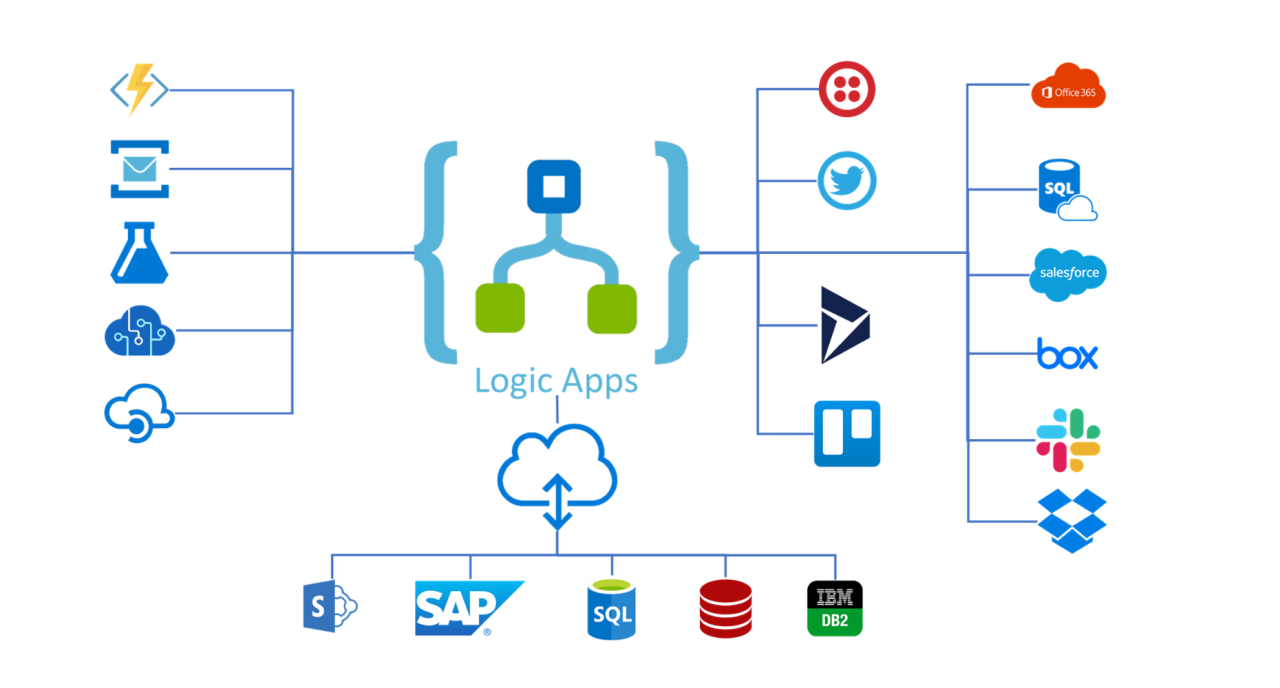
Image Source https://media.licdn.com/dms/image/C5612AQGZaDLx76251w/article-cover_image-shrink_423_752/0/1614053055222?e=1696464000&v=beta&t=QUe6fP_0iy-2b2czszV1pa9GL7Yufuc1VEFZhmUiFKI
Common Logic App Triggers
Azure Logic Apps support various types of triggers to kickstart workflows:
- HTTP Trigger – Initiated by HTTP requests (e.g., from portals, mobile apps, or external systems)
- Recurrence Trigger – Runs on a defined schedule (e.g., hourly, daily)
- Webhook Trigger – Triggered by callbacks from external systems
- File Trigger – Activated when a file is deposited in a specific folder or storage container
- Other Connectors – Including SQL, Service Bus, Blob Storage, Outlook, Teams, and hundreds more
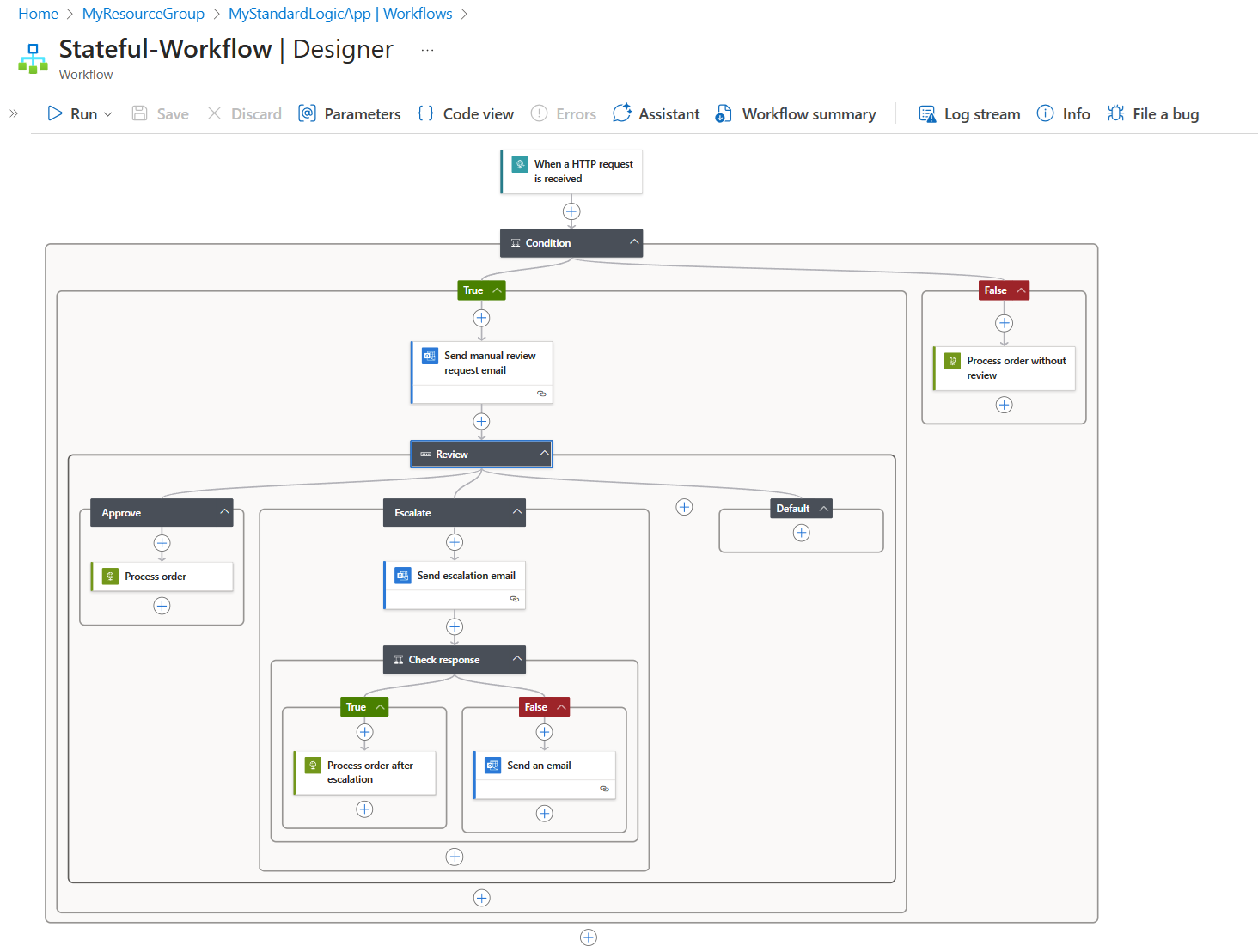
Image Source https://learn.microsoft.com/en-us/azure/logic-apps/media/logic-apps-overview/example-enterprise-workflow.png#lightbox
Real-World Use Case: Appointment Booking Orchestration
We developed a customized appointment booking system for one of our clients. Here's how we used Logic Apps to orchestrate the entire process:
Workflow Highlights:
- The workflow listens for booking requests from users via a portal.
- Based on the type of appointment, it routes the request to the correct backend system.
- It then retrieves relevant records tied to the appointment using data connectors.
- Finally, the system sends personalized EDM (Electronic Direct Mail) messages to users, tailored to the specific service they booked.
Thanks to Azure Logic Apps, the solution was built and deployed in days—not weeks—with minimal coding, and can scale with growing user demand.
Designing Workflows Visually or via Code
Logic Apps offer flexibility in how workflows are created and managed:
- Visual Designer – Build workflows using a drag-and-drop interface in the Azure Portal, Visual Studio Code, or Visual Studio.
- Code Editing (JSON) – For advanced scenarios, workflows can be edited directly in their JSON definition, providing greater control and customization.
Example: Conditional Workflow in Action
Let's walk through a simplified enterprise workflow scenario:
Scenario: Processing incoming orders with a conditional check for high-value transactions.
Logic Flow:
- A Logic App receives an order.
- A condition checks if the order exceeds a predefined amount.
- Based on the condition:
- If false: The order is automatically processed.
- If true: An email notification is sent for manual review.
- A switch statement handles the reviewer's decision:
- Approved → Process the order.
- Escalated → Send another email for further information.
- If escalation is resolved:
- Response true → Continue order processing.
- Response false → Notify the team of an unresolved issue.
This simple yet powerful flow showcases how Logic Apps can be used to model complex business logic in a manageable, transparent way.
Final Thoughts
By utilizing Azure Logic Apps, we've helped clients:
- Cut costs by eliminating expensive BPM tools
- Automate and streamline cross-system operations
- Rapidly deliver reliable, scalable solutions
Whether you're building an appointment engine, order processing system, or integrating multiple SaaS platforms—Logic Apps empower you to do more with less code.
Want to Automate Your Workflows?
If you're looking to simplify business process orchestration or need help building scalable integrations—let's talk. With Logic Apps, the future of automation is just a few clicks away.
